23Tape_1: Rebuilt from Scratch, and Why It Is a New Plugin
23Tape_1 is a from-scratch rewrite of 23DSP's most-downloaded plugin: what was fixed, what is new, why it installs alongside 0.8.3, and what every build must pass.
Marco Allegretti· updated
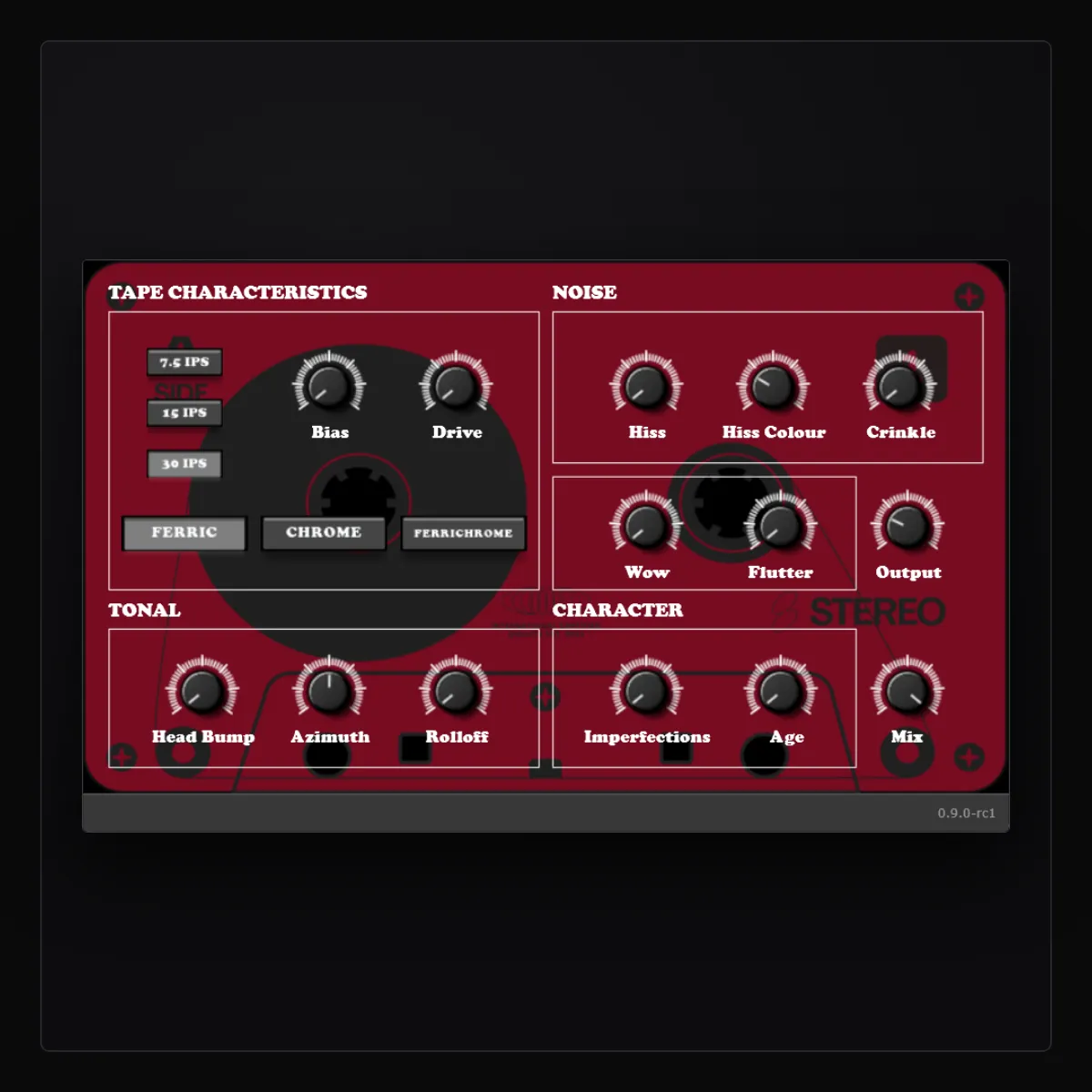
23Tape is the plugin more people have downloaded than anything else I have made. It was also built on tooling I had outgrown, and its best-known problem — the macOS install — was one I never got working on that stack. So I rebuilt it, from scratch, on the framework behind Season 02. This post is the changelog: what is different, what is fixed, and why the new one is a separate plugin.
Key takeaways
- 23Tape_1 is a complete rewrite. It keeps the concept and the same sixteen controls as 0.8.3, and nothing else — not the engine, not the interface code, not the plugin identity.
- 23Tape_1 needs no Gatekeeper workaround: the macOS installer is signed and notarised.
- It is a new plugin, not an update: it installs alongside 0.8.3, old sessions keep loading 0.8.3, and settings do not transfer.
- Every build now has to pass pluginval on three platforms, Apple’s auval, and an engine regression suite before it can be released.
Why it is a new plugin
The old 23Tape was built on a different stack, and the new engine shares no code with it. I could have given 23Tape_1 the old plugin identifier so DAWs would silently swap one for the other — and every session that relied on the exact sound of 0.8.3 would have changed underneath its owner. Instead, 23Tape_1 has its own identity: your host sees it as a different plugin, the two can be installed together, and a session that uses 0.8.3 goes on using 0.8.3 until you decide otherwise.
The 0.8.3 downloads stay on the Gumroad listing for a while, marked as outdated.
| 23Tape 0.8.3 | 23Tape_1 | |
|---|---|---|
| Plugin identity | original | new — installs alongside |
| macOS install | unsigned; Terminal workaround | signed, notarised installer |
| macOS formats | AU | AU, VST3, standalone |
| Windows | VST3 | VST3, standalone |
| Linux | — | VST3, standalone |
| Latency reported to host | — | about 6 ms |
| Release validation | — | pluginval, auval, regression suite |
Moving a track over
- Install 23Tape_1. Leave 0.8.3 where it is.
- Duplicate the track, insert 23Tape_1 on the copy, and dial it in by ear next to the original.
- Keep whichever you prefer. Nothing forces the switch.
What was fixed
The macOS install. 0.8.3 was not notarised, so every Mac user met a Gatekeeper warning and a
Terminal command — and its own listing warned that it would not load on every macOS version or in
Logic Pro. It was the one caveat printed on every 23DSP page. 23Tape_1 ships as a signed,
notarised
installer — one double-click — and its Audio Unit is validated with Apple’s auval in CI before
it is packaged. The same pipeline will serve every stable 23DSP release from here on.
Latency the host knows about. Wow and flutter modulate a real delay line, which means the engine needs a few milliseconds of room to move. 23Tape_1 delays its dry path by the same amount internally and reports the whole latency — about 6 ms — to the host, so nothing comb-filters at partial Mix and the track stays in time with the session. The regression suite checks it: at Mix 0 the output is the input, sample for sample, offset only by the delay the plugin reports.
Behaviour you can rely on. A set of things I could not promise about 0.8.3 are now tested on every build, and a release cannot be cut if any of them fail:
- Silence in gives silence out when the noise controls are down.
- The output does not depend on the host’s buffer size — the same settings render the same audio at 64 and at 2048 samples.
- There is no level thump when playback starts; the first block is already at steady state.
- The head bump does not ring: its impulse response decays within half a second.
- Hiss is genuinely decorrelated between channels, not one noise source split in two.
- Azimuth at zero is perfectly centred; off zero, the channels actually separate.
- Extreme settings stay finite and bounded.
What is new
- VST3 on macOS, alongside the Audio Unit.
- Linux. VST3 and a standalone app for Linux x64, validated with pluginval like the others.
- A standalone app on all three platforms, for using the plugin without a host.
What is the same
The idea, and the whole front panel — all sixteen controls carry over by name: tape speed at 7.5, 15 and 30 IPS; Ferric, Chrome and Ferrichrome; Bias and Drive into hysteresis saturation; Hiss with Colour and Crinkle; Wow and Flutter; Head Bump, Azimuth and Rolloff; Imperfections and Age; Mix and Output. Universal macOS binaries, too — 0.8.3 already ran natively on Apple Silicon. If you knew your way around 0.8.3, you know your way around this; the guide to every control covers what each one does in the new engine.
What it costs
Nothing. 23Tape was free, and 23Tape_1 is free. If it earns a place in your sessions, the About page says how to support the work.
This shipped as 0.9.0-rc1 — a release candidate wearing its version while the last reports came in. The reports came in: 0.9.1 is out, and stable. It adds an internal oversampling switch for the saturation stage and makes Head Bump bipolar, so it can cut the bump as well as boost it — the release notes have the details, and the control guide covers both. Tell me what you find: hi.23dsp@gmail.com, with your OS and DAW.