How to Use 23Tape_1: Every Control Explained
Every 23Tape_1 control explained — speed, type, Bias and Drive, Hiss, Wow and Flutter, Head Bump, Age — with starting settings and why they work.
Marco Allegretti· updated
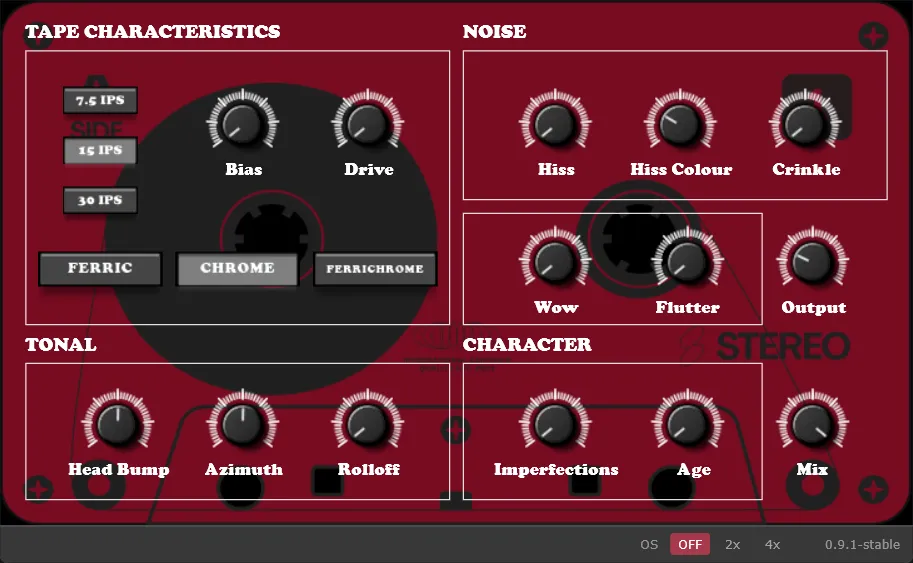
23Tape_1 has sixteen controls on the panel, an oversampling switch in the bottom bar, and no menus — and every panel control maps to something a tape machine physically does. This guide goes through them in the order they sit on the panel, explains what each does inside the Season 02 engine, and gives settings to start from. It is written for the rebuilt version, updated for 0.9.1 — if you are still on 0.8.3, the release post explains why the two are separate plugins.
A note on units, because the panel mixes them the way the knobs do: Drive, Wow, Flutter, Mix and Output read as percentages; Bias, Hiss, Hiss Colour, Crinkle, Rolloff, Imperfections and Age read from 0.00 to 1.00; Head Bump reads from −1.00 to +1.00; Azimuth reads from −10 to +10. Every value below is written the way the knob shows it.
Key takeaways
- Speed and tape type set the stage: speed decides where the top end rolls off and where the head bump sits; type decides the frequency tilt and how hard the tape compressor works.
- Drive and Bias are the saturation pair, and Bias also reshapes the compressor — set Drive first, then use Bias to change the character of the squash.
- Wow and Flutter are separate controls. Wow is the slow drift, Flutter the fast one; a little of each reads as “tape”, a lot reads as “broken tape”, and both are useful.
- Mix is a true parallel blend: the dry path is delayed inside the engine to match the wet one, and the whole latency — about 6 ms — is reported to the host.
- The oversampling switch (Off, 2×, 4×) affects only the saturation stage: less aliasing at high Drive, the same tone, the same latency at every setting.
Tape characteristics
Speed — 7.5, 15 or 30 IPS
On a real deck, faster tape keeps more high end, and the engine models that directly. The high-shelf corner sits at roughly 7.5 kHz at 7.5 IPS, 15 kHz at 15 IPS and 20 kHz at 30 IPS. The head bump moves with it: lower and more pronounced at slow speed (around 76 Hz at 7.5 IPS), 72 Hz at 15 IPS, higher and gentler at 30 IPS (around 65 Hz).
Pick the speed as a tone decision, not a quality setting. 7.5 IPS is the darkest, most coloured option — the home-deck sound; 30 IPS is the mastering deck.
Type — Ferric, Chrome, Ferrichrome
Each formulation changes two things at once: the frequency tilt and the built-in tape compressor.
| Type | Tilt | Compressor |
|---|---|---|
| Ferric | +2 dB low shelf, −2 dB high shelf | 3:1 from −18 dB — the squashiest |
| Chrome | +1 dB low, flat high | 2.5:1 from −24 dB |
| Ferrichrome | +0.5 dB low, +2 dB high shelf | 2:1 from −30 dB — the most open |
Ferric is the warm, thick option and the one that compresses hardest; Ferrichrome is bright and stays dynamic; Chrome is the sensible middle. If a mix needs glue more than colour, start on Ferric and leave Drive low.
Drive
Input gain into a hysteresis saturation stage — a model of the magnetic memory of tape, where the output depends on where the signal has been, not only where it is (magnetic hysteresis). That is why it behaves differently from a static waveshaper: transients and sustained material saturate differently. Drive runs from 0 to 200%. Up to about 30% you get weight and a softened peak; past 100% it is a distortion effect, and a good one.
Bias
On a deck, bias current changes how the tape saturates. Here it shifts the saturation curve and reshapes the compressor — a higher ratio that starts later — so turning Bias up makes the squash harder above the knee without adding the grit that Drive adds. Set Drive for how much distortion you want, then use Bias to choose between a loose and a dense version of it.
Noise
Hiss and Hiss Colour
Band-limited tape noise, generated independently for the left and right channels so it sits across the stereo field instead of collapsing to the middle. Colour tilts it from dull to bright. For realism keep Hiss well under 0.20 and let it be something you notice only when you bypass the plugin; for lo-fi pushes, turn it up and pull Colour down.
Crinkle
The uneven, modulated texture of a worn oxide layer — closer to a dropout than to hiss. It tops out at 0.50 by design; a little goes a long way.
Wow and Flutter
The two speed instabilities of a transport, each on its own knob. Wow is the slow drift, centred around a quarter of a hertz; Flutter is the fast one, in the 5–8 Hz range, and its rate rises from 5 Hz toward 8 Hz as you turn it up (wow and flutter). On sustained material — pads, held chords, vocals — Wow at 10–20% is the difference between “digital” and “tape”; Flutter is what makes a piano sound like a cassette. Both modulate a real delay line, which is why the plugin has about 6 ms of latency: it needs room to move.
Tonal
Head Bump
The low-frequency lift a playback head produces. Its centre follows the tape speed, so it always lands where that speed’s bump would be. Since 0.9.1 the knob is bipolar: to the right it boosts the bump, to the left it cuts the same region. The cut is the new trick — if Ferric plus a high Bias setting leaves the low end thicker than you want, pulling Head Bump down takes that lift back out at exactly the frequency the speed put it, and at −1.00 it can neutralise it entirely.
Azimuth
Head misalignment, modelled as the two things a misaligned head really causes: a timing skew between the left and right channels and a loss of high end. At 0.0 the channels are perfectly centred. Small amounts widen and soften; large amounts are an effect.
Rolloff
Pulls the speed’s own high-frequency corner down by up to 70%, for when 7.5 IPS is still too bright.
Character
Imperfections
Slow random drift applied across several stages at once — saturation drive and bias, the tone shelves, and the wow and flutter rates — so nothing sits perfectly still. This is the “it’s a machine, not a plugin” control. Around 0.30 is plenty.
Age
Wear. The high-shelf corner drops by up to 30% as the tape ages, which darkens the top end on top of everything else. Combine with a little Crinkle for a reel that has been in a drawer for twenty years.
Mix and Output
Mix is a true parallel blend. The dry path is delayed inside the engine to match the wet path, and the whole latency — about 6 ms — is reported to the host, so nothing comb-filters at partial Mix and the track stays in time with the rest of the session. Output is a clean trim after everything else.
The oversampling switch
The one control that is not on the panel, because it is not something a tape machine does: three chips in the bottom bar — Off, 2× and 4× — added in 0.9.1. The hysteresis saturation stage is the only nonlinear part of the engine, so it is the only part that aliases; the switch runs just that stage at two or four times the sample rate. Two details make it safe to reach for:
- The tone does not change. The saturation stage has a one-sample feedback that behaves like a filter, and naively oversampling it would move that filter’s corner up and thin the sound. The engine re-maps the stage so the corner and the level stay put — the regression suite renders the same settings at Off and 4× and checks the tone matches, while the aliasing drops by at least 10 dB at 2× and 20 dB at 4×.
- The latency does not change. All three settings report the same latency, so your host never has to resync when you switch.
When to use it: high Drive on bright material — hats, full mixes, anything with real energy near the top of the spectrum — is where aliasing lives; 2× is usually enough, 4× is for printing. At low Drive the stage barely bends the signal, and Off is fine, which is why Off is the default.
Three starting points
| Goal | Speed / Type | Drive · Bias | Other | Mix |
|---|---|---|---|---|
| Mix-bus glue | 30 IPS · Ferric | 15% · 0.20 | Head Bump 0.20 | 60% |
| Warm drums | 15 IPS · Chrome | 45% · 0.40 | Head Bump 0.40, Wow 5% | 100% |
| Worn home reel | 7.5 IPS · Ferric | 70% · 0.60 | Hiss 0.25, Wow 30%, Flutter 40%, Age 0.50, Rolloff 0.30 | 100% |
None of these are presets shipped in the plugin — they are where I start, and the point of the guide is that you can now predict what each knob will do before you turn it.
What changed between 0.8.3 and 23Tape_1, and what the rebuild fixed, is in 23Tape, rebuilt.