How to Use Time Terrarium: Habitats, the Orb, Migrate and Seal
How Time Terrarium works — planting species in the four habitats, placing and orbiting the orb, Migrate, Pattern, Seal, the Space controls and Roll — and which presets to start from.
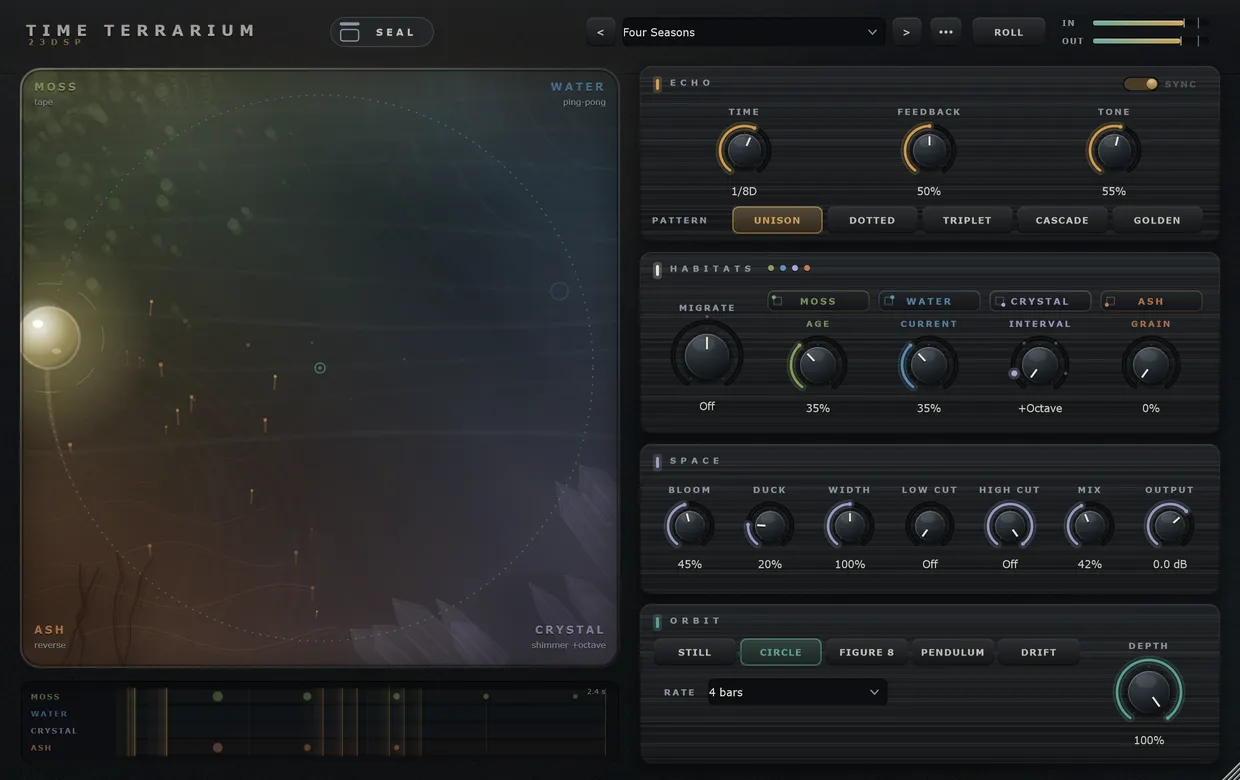
Time Terrarium looks different from most delays, but it follows a simple order: the habitats decide what kind of echo you get, the orb decides where new sound lands, and the Echo and Space panels shape all of it at once. This guide goes through the window in that order, then covers Seal, Roll and the presets.
Key takeaways
- The four corners of the glass are habitats. Each holds one species of echo with one Character control.
- The orb places new sound. In a corner you get one habitat; between corners you get a blend.
- Migrate moves repeats from habitat to habitat. Pattern gives each one its own echo time.
- Seal holds what is inside at a steady level and lets nothing new in.
- Low Cut and High Cut work on the echoes and the bloom only. The dry signal is never touched.
1. The habitats
The four corners of the glass are habitats, and each is planted with a species:
| Species | What it is | Character control |
|---|---|---|
| Moss | tape | Age: wow, flutter, saturation, darker repeats |
| Water | ping-pong | Current: how strongly the repeats swirl and smear |
| Crystal | shimmer | Interval: +Octave, +Fifth, +Twelfth or −Octave |
| Ash | reverse | Grain: shorter reversed fragments, up to stuttering sparks |
| Frost | melting | Melt: how much each repeat blurs on its way round |
| Dust | grains | Scatter: how far the grains spread in time and stereo |
| Pebble | bouncing | Bounce: from an even roll to a stone skipping to rest |
| Wind | gusts | Gust: how far and how fast the filter sweeps |
The four Character knobs sit in the Habitats panel, one under each habitat’s name, in the same order as the corners.
- Plant a different species: click a habitat’s name, in the glass or in the panel, and pick one. Replanting clears that habitat’s echoes.
- Swap two habitats: drag a name in the glass onto another corner.
2. The orb
The orb decides which habitats new sound goes into.
- In a corner, everything you play feeds that one habitat. This is the easiest way to hear what each species does: play a phrase and drag the orb from corner to corner.
- Between corners, the input is shared between the habitats around it.
- Double-click the glass to put the orb back in the centre, where all four get an equal share.
Orbits
The Orbit panel moves the orb for you. Still leaves it where you put it; Circle, Figure 8, Pendulum and Drift move it around the point where you placed it. Rate is how long one cycle takes, from 1/2 bar to 16 bars. Depth is how far the orb travels from its centre.
While an orbit runs, dragging the orb moves the centre of the orbit. With Sync on and the host playing, the orbit follows the host’s bar position, so it lines up with the song. With the host stopped it runs freely at the host tempo.
3. Echo
- Time: with Sync on, a note value of the host tempo from 1/32 to one bar, including dotted and triplet values. With Sync off, up to four seconds.
- Feedback: how long each echo keeps repeating.
- Tone: darkens or brightens the repeats as they feed back, and colours the bloom.
- Pattern: gives each habitat its own multiple of the echo time.
| Pattern | What happens |
|---|---|
| Unison | all four habitats at the same time |
| Dotted | ×1, ×0.75, ×1.5 and ×2 — dotted cross-rhythms |
| Triplet | ×1, ×⅔, ×1⅓ and ×2 — triplet cross-rhythms |
| Cascade | ×1, ×0.5, ×2 and ×4 — a falling staircase |
| Golden | spaced by the golden ratio, so the four never quite line up |
When a pattern is on, each habitat shows its multiple next to its name.
4. Migrate
Migrate sends each repeat on to the neighbouring habitat as it comes round. Turned right it goes clockwise, from top left to top right, bottom right and bottom left; turned left it goes the other way. At the centre, every habitat keeps its own echoes.
With the default planting this is the fastest way to hear the whole plug-in: one note, then tape, ping-pong, shimmer and reverse in turn.
5. The lanes
Under the glass, one lane per habitat shows the repeats a single note would produce with the current settings, with the loudest as the biggest dots. Use it to check a pattern or a feedback setting before you play into it.
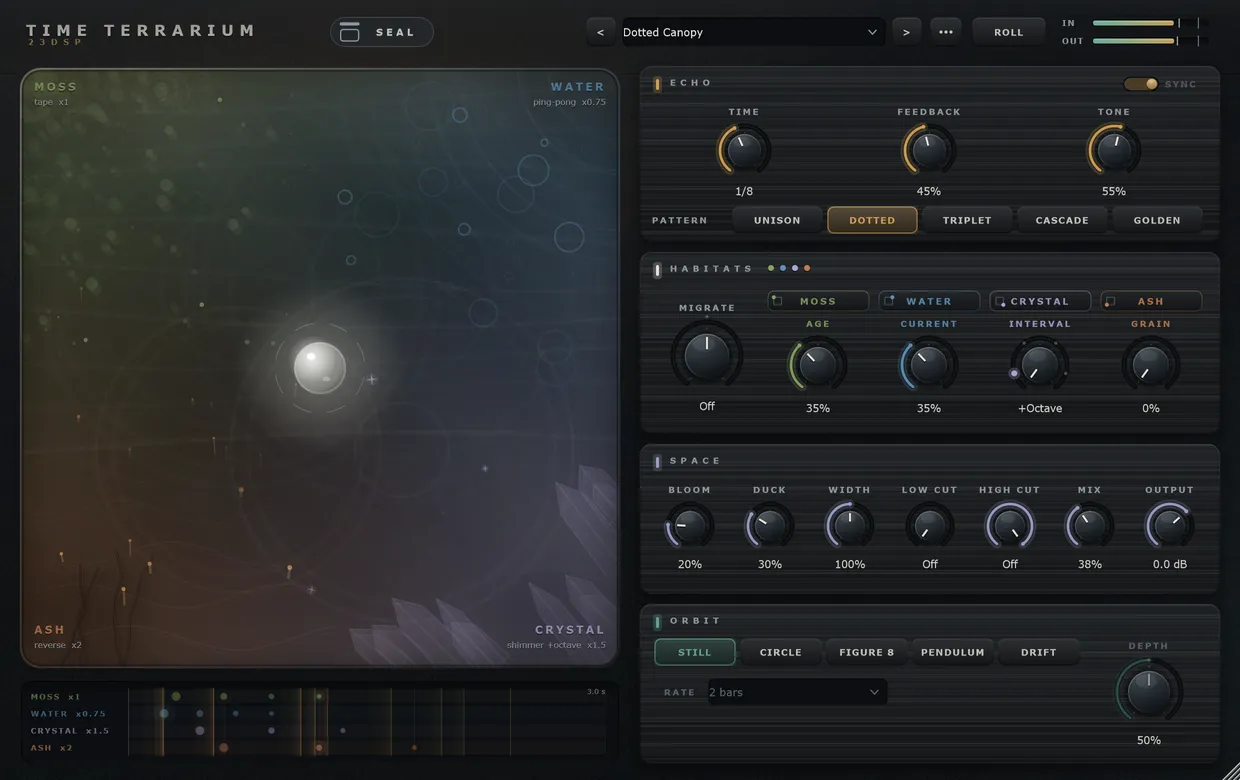
Dotted Canopy: each lane shows its habitat on a different multiple of the echo time.
6. Space
- Bloom: sends the echoes, and a little of the dry signal, into a reverb. Higher is larger and longer.
- Duck: lowers the echoes while you play and lets them swell back in the gaps. On a vocal, this keeps the words clear.
- Width: from 0% (mono) to 200% (extra wide), for the echoes and the bloom.
- Low Cut and High Cut: take low end and top end out of the echoes and the bloom only.
- Mix and Output: the dry/wet balance, and the final level.
7. Seal
Seal, at the top of the window, closes the lid. Nothing new gets in, and the echoes already inside keep circulating and migrating at a steady level until you open it again. While it is closed, Feedback and the orb have no effect, and the habitats’ tone filters open a little so the held echoes stay bright.
Two ways to use it:
- Hold a texture. Play a phrase, seal, and play over what is inside.
- Automate it. Seal on the last beat of a section and open it where the next one starts, so the tail carries the transition.
Sealed Jar is a preset made for this.
8. Roll and the presets
Roll throws a new random starting point: orb, orbit, synced time, feedback, tone, pattern, migration, species and characters, bloom, duck and width. It opens the lid and clears the cut filters, and leaves Mix and Output where they were.
The “…” menu next to the preset name saves your own presets, deletes the loaded one, opens the preset folder, or clears the echoes.
| If you want | Start with |
|---|---|
| A plain tape echo | Terrarium, Morning Moss, Tape Slap |
| Ping-pong | Tidepool, Pendulum Pong |
| A dub-style delay | Dub Garden |
| Rhythmic cross-patterns | Dotted Canopy, Triplet Rain, Cascade Steps |
| Shimmer and big space | Glass Cathedral, Frost Bloom, Twelfth Night |
| Something under a vocal | Vocal Halo |
| Reverse | Ember Rewind, Ember Stutter |
| Echoes that move | Four Seasons, Migration, Wandering Tide, Firefly Drift |
| A held texture | Sealed Jar |
| The other four species | Winter Garden, Skipping Stones, Sandglass, Gale, Thaw, Stone Circle |
The release post covers what the plug-in is for. The dry/wet comparisons are on the product page.