How to Use XY Reverse Slicer: Slice Length, Texture and the Grid
How the two axes of XY Reverse Slicer work, why the slices land on the song timeline instead of on the moment you pressed play, and the settings that turn a vocal into a stutter or a chord into a swell.
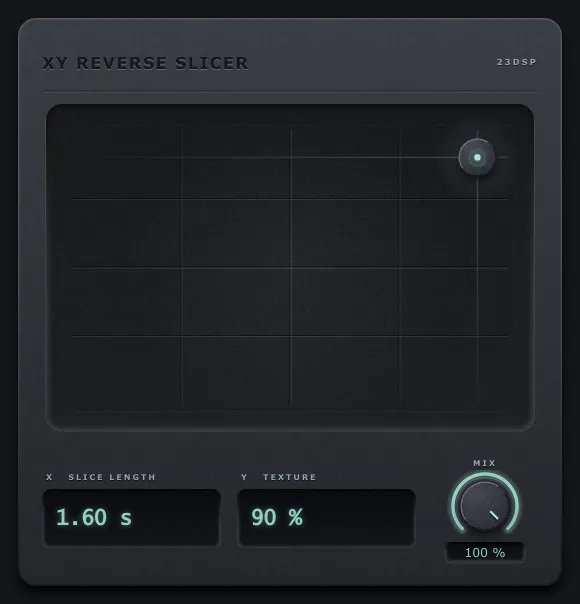
XY Reverse Slicer does one thing: it records what goes into it and plays each completed slice back in reverse, crossfading one slice into the next. Two controls decide what that sounds like.
X — slice length
20 ms to 2 seconds. The axis is skewed so the centre of the pad is 250 ms, which puts the musically useful range under your hand rather than squashed into the left edge.
Length is the whole character of the effect:
- 20–80 ms — a stutter. The slices are short enough that pitch and rhythm survive but the attacks are gone, so a vocal turns into a texture and a drum loop turns into a machine.
- 100–300 ms — the rhythmic range. You hear individual reversed events. On drums this is a scramble that still follows the groove.
- 400 ms–1 s — phrases reverse. A melody plays its notes forward in order but each note arrives backwards.
- 1–2 s — swells. A chord that would have decayed now arrives, which is the classic reverse lead-in.
A useful habit: set the length against the tempo rather than against the material. At 100 BPM a bar is 2.4 s, a beat is 600 ms and a sixteenth is 150 ms. Those three numbers cover most of what you will want.
Y — texture
The crossfade between one slice and the next, from 1.5 ms up to half the slice.
At the bottom it is a hard cut: each slice stops and the next begins. That is the stutter sound, and on anything sustained it will click rhythmically — which is often exactly what you are after.
At the top each slice laps over the next by half its length, so you are always hearing two reversed slices at once. Long slices with high texture stop sounding like slicing at all and start sounding like a reverse reverb.
The crossfade is equal power, and the windows sum to unit power within 0.0000002. Where consecutive slices are unrelated that holds the level to about 0.01 dB, and you can sweep the texture axis while it plays without the level moving.
Where consecutive slices are correlated it does not, and that is worth knowing rather than hiding: a cos/sin pair sums to unit power only for uncorrelated material, so across a boundary between in-phase or anti-phase content the sum is 1 + 2/π or 1 − 2/π. At the extreme — the shortest slices with the texture at maximum, so every sample is inside a crossfade — the level can move by up to +2.1 or −4.4 dB. On a real musical part at that corner the most measured is about half a decibel, which is the one place the effect is not level-neutral.
Mix
Equal power, so dry and wet sum to the same loudness as either alone, and 0 % is the input bit for bit.
Low Mix is underrated here. At 25–40 % the reversed material sits under the part like a shadow and you get the hook without losing the words. That is the setting to reach for on a lead vocal.
The slices land on the grid
While the transport is playing, slice boundaries follow the song timeline rather than the moment you pressed play. Two things follow from that, and they are the reason this plug-in is usable in an arrangement rather than only as a performance toy:
- A bounce matches what you heard. Render a section and you get the same slicing as playing it, in any host.
- Locating keeps its place. Jumping around the arrangement re-anchors to the timeline instead of restarting the pattern wherever the playhead happened to land.
With the transport stopped it free-runs, so live input still slices.
The practical consequence: if you want a reverse swell to land exactly on a downbeat, set the slice length to a musical division of the bar and it will, every time, without you nudging the clip.
Four settings worth having
| What you want | X | Y | Mix |
|---|---|---|---|
| Vocal stutter | 60 ms | 7 % | 100 % |
| Rhythmic chop | 350 ms | 50 % | 100 % |
| Reverse swell into a bar | 1.6 s | 90 % | 100 % |
| Shadow under a lead | 305 ms | 55 % | 42 % |
What it costs
Nothing in latency — it reports zero and allocates nothing on the audio thread. The reported tail is 4 seconds, which is the longest the effect can produce, so hosts stop trimming the reversed tail at long slice lengths.
One honest limit: a NaN arriving from a plug-in upstream passes once on the dry path, as it would through any plug-in, and is recorded into the slice buffer as silence rather than being replayed at you four times.
Hearing it
There is a sound demo on YouTube: four bars dry, then eight bars wet, with the interface as it plays. The four settings in the table above, in order. The product page has the same comparisons as an A/B player, plus a few the video leaves out.