Dualite: Two Chains, Not One
Dualite is a dual-chain multi-effect: two independent racks running left/right or mid/side, with 24 effects, four lanes, modulation and 90 presets. What it does and why it exists.
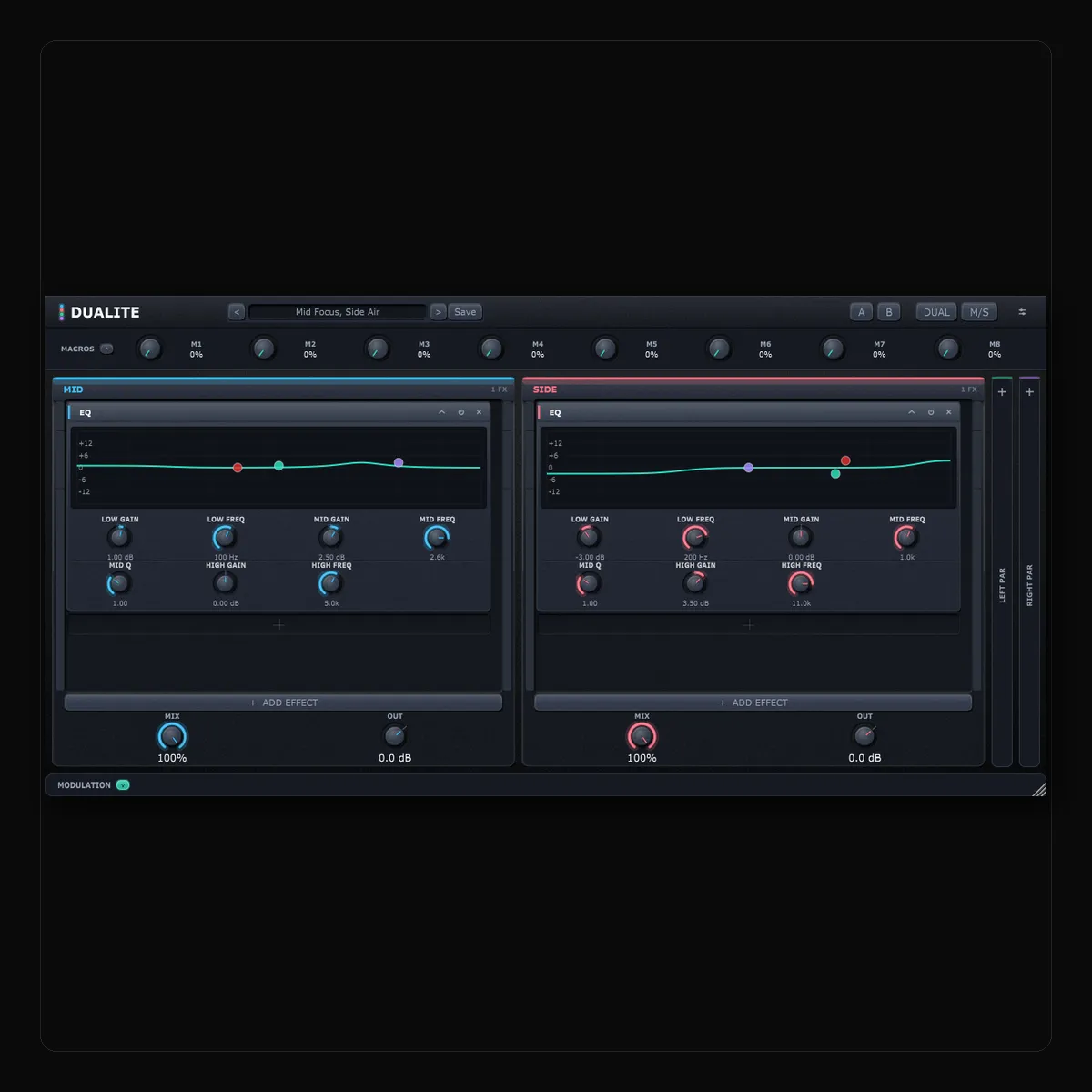
Every multi-effect I have used gives you a rack and runs your whole signal through it. That is fine until the thing you want to do is different on one side of the signal than the other — and once you notice how often that is what you want, a single rack starts to feel like a limitation you have been working around for years.
Dualite is the plugin that stopped working around it. It gives you two independent racks, and lets you decide what the two halves of your signal are: left and right, or mid and side. That one decision is the plugin.
Key takeaways
- Two independent effect chains, switchable between left/right and mid/side, each up to eight effects deep, each with its own parallel lane.
- 24 effects, four modulation slots (LFO, envelope follower or ADSR) and eight macros, all assignable across both chains independently.
- 90 presets in ten categories, searchable by instrument and genre, each with a description of what it does and when to reach for it.
- €15, and 20% off for the first week with the code DUALITE20.
- This is 1.0.0-rc4 — a release candidate, wearing its version honestly.
What one rack cannot do
Put an EQ across a stereo mix and every move you make lands everywhere. Add presence and you add it to the room as well as the vocal. Add air and the cymbals and the reverb tails come up together. Roll off the mud and you thin the sides along with the middle. You end up choosing the least bad compromise, because one curve has to serve two different jobs.
Now split the signal into mid — what the two channels have in common, which is where the kick, the bass, the snare and the lead usually sit — and side — what they do not share, which is the room, the widened synths and the reverb. Give each one its own EQ. The compromise disappears. You put presence in the middle and air at the sides, and neither move touches the other.
That is one example. Here are the ones I reach for most:
- A high pass on the side channel only, so the low end collapses to the centre and stays solid while everything above it keeps its width.
- Reverb on the side and nothing on the mid, so a lead opens up without moving backwards in the mix — the dry signal stays exactly where it was.
- A fast compressor holding the centre steady while a slower one lets the room breathe.
- A delay with two different times, left and right, so the repeats cross the image instead of stacking up on top of it.
None of that is a preset trick. It is just what having two chains means.
Four lanes
LEFT and RIGHT are the main pair. Switch to M/S and they become MID and SIDE — everything else works the same, only what the two lanes carry changes.
Behind each one sits a parallel lane with its own Send, Mix and Out. That is where New York compression goes, or parallel saturation, or a reverb send that never touches the dry path. They stay collapsed to a narrow rail until you switch one on, so the window only shows what you are actually using.
What is in it
24 effects, each of which can sit anywhere in either chain, up to eight deep, in any order — drag a slot by its header to move it.
- Tone — EQ, Filter, Analyzer
- Character — Saturation, Clipper, Bitcrusher, Phase Distortion, Noise
- Dynamics — Compressor, Limiter, Gate, Transient Shaper, Gain
- Space — Reverb, Convolution Reverb, Delay, Granulator, Tape Stop
- Movement — Chorus, Flanger, Phaser, Tremolo, Ring Mod, Frequency Shifter
Four modulation slots, each an LFO, an envelope follower or an ADSR. Right-click any control to assign one, with a depth and a polarity. Because the chains are independent, a single source can drive the two sides in opposite directions — a filter opening on the left as it closes on the right, from one LFO.
Eight macros on top of that, each mapped to as many destinations as you like and automatable from your host under its own name.
The presets that explain the plugin
There are 90, across ten categories, tagged by instrument and genre so that searching “snare”, “trap” or “width” finds something instead of making you scroll. Every one carries a description of what it does and when to reach for it.
The Stereo Field category is the one to open first, because those are the presets that cannot exist in a single-chain plugin: Mid Focus, Side Air. Bass Mono, Sides Wide. Side Reverb Only. Mid Punch, Side Glue. De-Harsh The Sides. Ping Pong Delay. Haas Widener. Opposing Sweeps. Load one, look at what the two lanes are doing differently, and the whole idea explains itself in about five seconds.
Living in a session
Every control in every slot is exposed to your host, named for whatever occupies the slot — and bound to the position rather than to the effect, so if you reorder a chain your automation follows the slot rather than chasing the effect around.
Undo goes sixty-four steps deep and covers chains, preset loads and assignments — build something, drag it into the wrong slot, take it back. A/B holds two complete states to compare. Host bypass is crossfaded and delay-compensated rather than a hard mute. The window drags to any size, in a dark or a light theme.
What it costs
€15, and 20% off for the first week with the code DUALITE20 at checkout.
Windows gets VST3 and LV2; macOS gets VST3, Audio Unit and LV2 as a signed, notarised installer — one double-click, no Gatekeeper detour; Linux gets VST3 and LV2.
It is a release candidate
This build is 1.0.0-rc4: feature-complete, and wearing its version honestly while the last reports come in. If something misbehaves in your DAW, write to hi.23dsp@gmail.com with your OS and DAW — reports get priority, and they are what turns a release candidate into a 1.0.
If you want the practical version — what to actually do with two chains, and how mid/side works when you are looking at it rather than reading about it — that is in How to Use Dualite.