
23ArpDelay
A delay that plays the scale back to you.
- Formats
- VST3 · AU · LV2
- Platforms
- Windows · macOS · Linux
- Requirements
- 64-bit host, mono or stereo · Licence key, activated online once — one key covers three machines · A pitched tap needs about 46 ms; unpitched taps go down to a single sample
23ArpDelay is a delay whose repeats know what key you are in. Play one note and the taps climb a scale. Play a chord and each tap lands somewhere else in it. Every tap’s pitch is measured from what you played rather than from a fixed root, so moving the part up a fifth moves the pattern with it — nothing to re-enter, nothing to transpose.
The pattern builder
Four dropdowns and two sliders set every tap at once. Shape picks the outline: Rising Steps, Valley, Arch, Spread Wide, Octave Jumps, Scatter. Scale covers major, natural minor, the modes, pentatonic major and minor, blues, whole tone and chromatic. Motion runs Up, Down, Up-Down, Down-Up, Random, Converge, Diverge or Skip. Spacing steps in scale degrees, thirds, fourths, fifths or octaves, across one to four octaves and up to sixteen taps.
Change the scale and the pattern requantises under your hands. The graph shows what you will hear before you play: one dot per tap, its height the interval, its stem the timing.
Or one tap at a time
Click a dot and the right-hand panel belongs to that tap — level, interval, stereo position, a filter with cutoff and resonance, its own subdivision or a free time in milliseconds, mute and reverse. Drag a dot and it snaps to the nearest note in the current scale, so editing by hand stays in key.
The pitch shifting
Each tap gets its own phase vocoder, per channel, and two consequences matter in practice. A tap two octaves up is as loud as a tap at unison, so widening a pattern does not send you back to rebalance it. And pitched taps land on the same beat as unpitched ones, because each tap is compensated for the shifter’s own latency.
A tap with no shift skips the shifter completely: no frame latency, and any delay time down to a single sample. That is why this still works as a plain short delay when that is all you need. There is a Formant mode for material that starts to sound cartoonish when shifted, and the feedback path is soft-clipped so it stays bounded at any combination of Repeats and resonance.
MIDI, optional
Follow MIDI takes the reference note from the notes you play, so the names on the graph match the part. MIDI Output passes the arpeggio on as MIDI for another instrument to play. The plugin is an audio effect first and needs neither to work.
Activation
The licence key comes with your Gumroad receipt. Paste it into the plugin, press Activate, and that machine is done — one key covers three. After the first check it works offline, re-checking quietly about once a fortnight, and a failed check never takes the licence away. The full walkthrough covers every error message.
Watch it
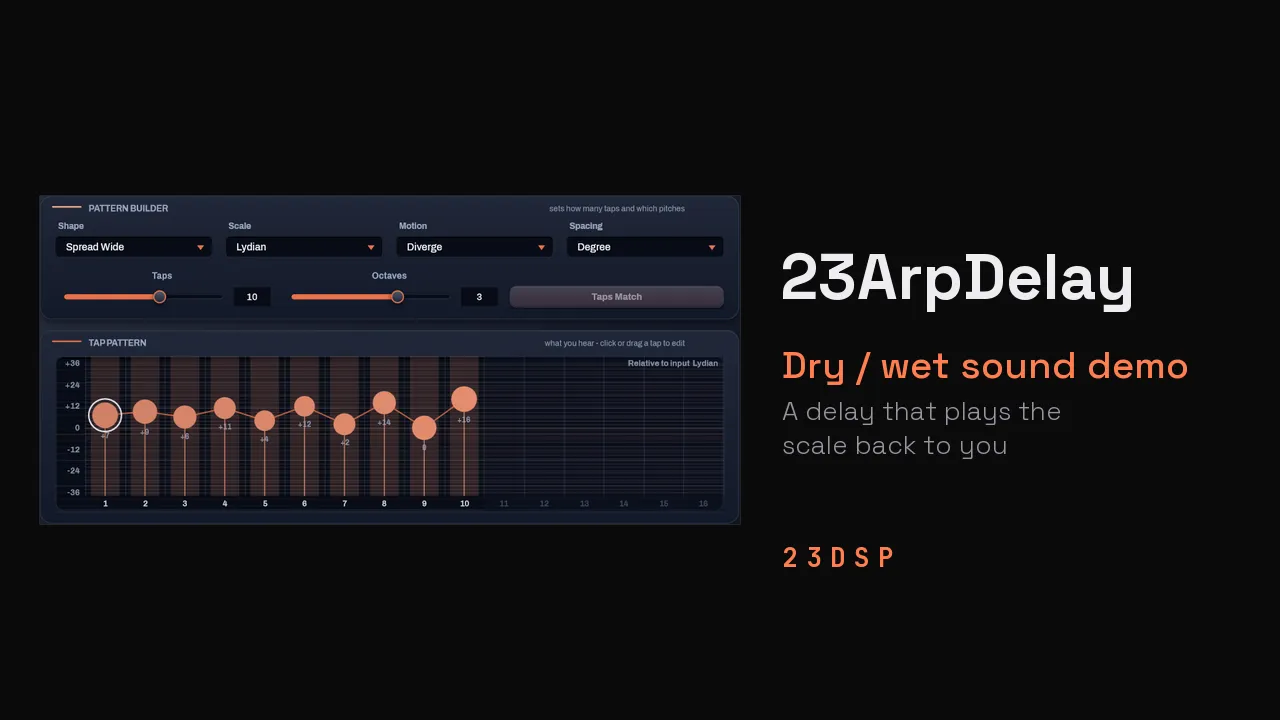
Screenshots
The pattern builder sets every tap at once. The graph shows the result before you play a note. The advanced view, for when you want every tap parameter on screen at once. 24 presets in five categories, searchable by name, category or tag.
Hear it
- Keys — one part, four patternsAn excerpt from one of my own tracks at 105 BPM. Same input every time; only the pattern builder changes.0:00–:––Level100%
- Chords — scale and motionA chord part at 125 BPM. Minor and Dorian, then Converge, then Repeats pushed until the delay takes over.0:00–:––Level100%
Release notes
0.9.0-rc6
- Pitched taps run on a faster transform. Measured on Windows at 48 kHz, six pitched taps went from 16.8% to 11.0% of one CPU core and sixteen from 61.2% to 39.4%; with Formant on, sixteen went from 88.2% to 63.2%. Linux gets the same transform. Unpitched taps cost what they did.
- The sound, presets, sessions and licence are unchanged. There is no need to activate again.
- The third-party licence notices now ship with every download, including the macOS installer.
0.9.0-rc5
- First public release, built on the Season 02 framework.
- Signed and notarised macOS installer, universal for Intel and Apple Silicon.
- 24 factory presets in five categories, with user presets, import and export.
- Licence key activation — one key covers three machines, and works offline between checks.
From the journal
More Delay
All delay plugins
23ArpDelay is sold through Gumroad, which handles checkout, licences, downloads and updates.
Buy on Gumroad