23Bloom: Bloom Rebuilt, and Renamed
23Bloom rebuilds Bloom with crossovers you can place, an Amount per band, level-matched monitoring, and loudness tracking that works. VST3 and AU for Windows, macOS and Linux.
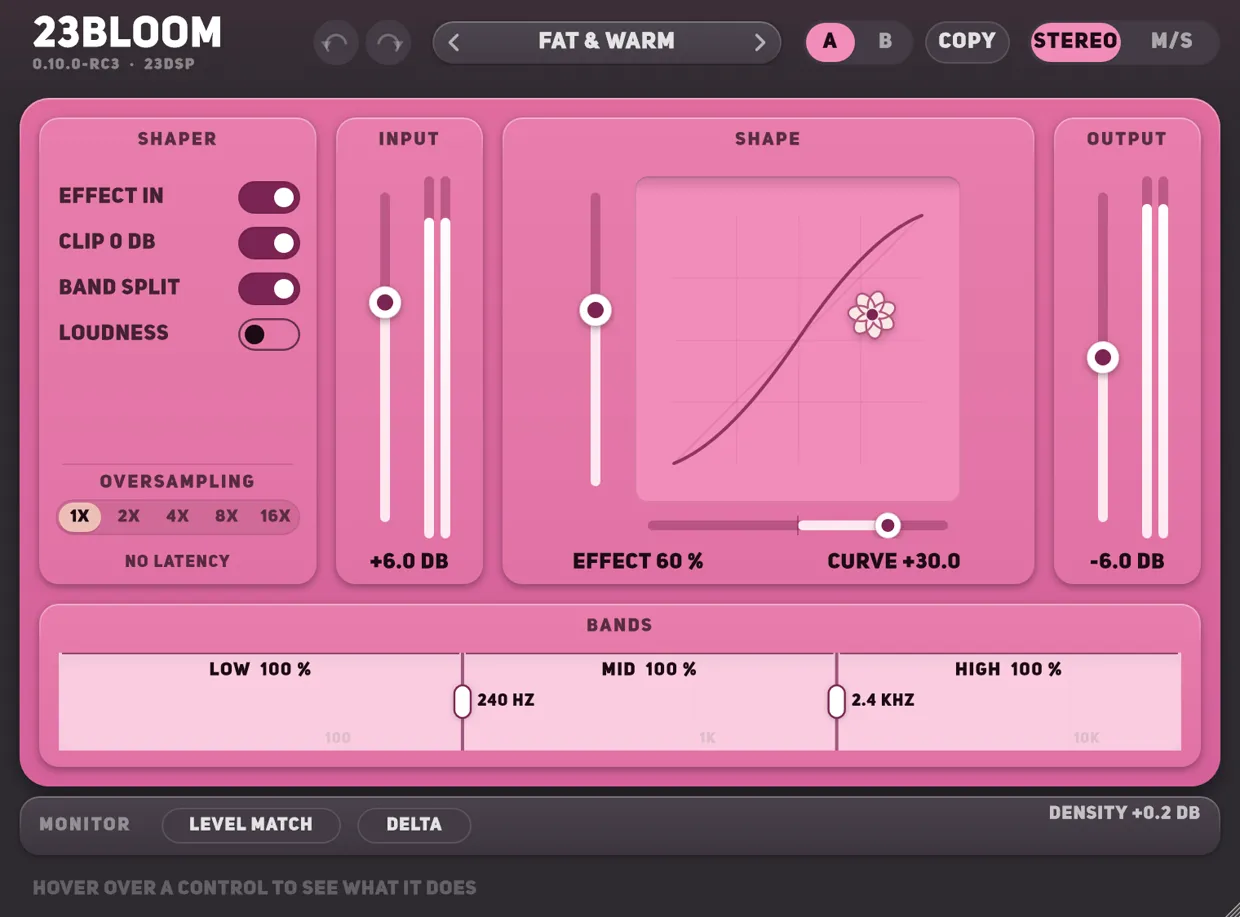
Bloom adds harmonics instead of gain. It drives the signal into a transfer curve that lifts the quiet detail and folds the loud parts under full scale, so what comes out is denser and louder to the ear without a compressor’s grip on the dynamics. It has been in the shop since February 2025 and it is the paid plug-in from back then that people kept buying without me saying a word about it.
23Bloom is the rebuild, on the same framework as 23Tape_1 and DE-_1. It also carries a new name, and that part is my fault.
Key takeaways
- The same plug-in, rebuilt: Stereo and Mid/Side as before, now as three complete sets of controls in one tree rather than two parallel networks.
- The band split moved: both crossovers are controls now, and each band has its own Amount.
- Loudness tracking works. In Bloom the switch was wired backwards.
- Level Match, Delta and Solo, so you can judge a setting instead of guessing at it.
- 18 presets, where Bloom had none. Presets you saved in Bloom import.
- Signed and notarised on macOS, so the Terminal step is gone. Linux is new.
- Still pay what you want from €10, and it is the same product page: if you own Bloom, 23Bloom is already in your library.
About the name
Another developer already had a plug-in called Bloom when I released mine. I did not check, which is a careless thing to not do, and the longer it stayed the worse it got. The rebuild was the moment to fix it, so the plug-in is 23Bloom and the old name retires with the old build. The Gumroad page, the link and your library entry are all unchanged.
What is the same
The curve. The polynomial coefficients are identical to Bloom’s, so at the same Curve, Effect, Input and Output, 23Bloom sounds like Bloom. If you have a mix you liked, you can get back to it.
Mid/Side is not new either, and neither is the XY pad or oversampling — Bloom had all three. What changed is underneath: the stereo, mid and side sections are three equal sets of parameters in one tree, where the old build ran two parallel networks and switched between them.
What is new
A band split you can place. Bloom’s split was a switch: it cut at 240 Hz and 2.4 kHz, fixed, and shaped all three bands the same way. In 23Bloom both crossovers are controls — 60 to 800 Hz and 1 to 10 kHz — and each band has an Amount from 0 to 100 %. The low end can pass untouched while the mids and highs take the curve, which on a mix bus is the difference between a plug-in you can leave on and one you cannot.
The three bands also add back to the input exactly now. Bloom compensated its split with a gain factor and left a tilt behind; 23Bloom uses the Oxford Inflator’s own split instead — a one-pole low-pass and a one-pole high-pass, with the mid as what is left over — and nulls against RCInflator2, the open-source reproduction of that Inflator, on every build.
Loudness tracking that works. This is the part I am least pleased about and most glad to have found. In Bloom the Loudness switch was wired the wrong way round: the modulation was added while the button was off, and the interface hid the Amount knob in exactly that state. The net effect is that loudness tracking never did anything in either shipped build.
It does now. The detector is K-weighted — a high-pass at 100 Hz, a 4 dB bell at 2 kHz, a low-pass at 8 kHz — so it follows what you hear rather than the waveform, and a Response control sets how it lets go: Fast in 40 ms, Slow in 800 ms, Auto between the two depending on how sustained the material is. Watch the second flower on the pad; that is the curve the signal is actually hitting, against the one you set.
Monitoring. Four things, all about judging a setting rather than making it. Level Match offsets the output by what the drive and the shaping add to pink noise at −16 dBFS RMS, so you can move Curve and Effect without the level moving with them and fooling you into liking the louder one. Delta plays only what the plug-in adds. Density reads the change in crest factor. And there are input and output meters, which Bloom did not have.
A preset library. 18 presets filed by what they are for — starting points, mix bus, mastering, drums, bass, vocals, and a set for the split modes — each with a line saying what it does. Bloom shipped with none at all.
Installs everywhere.
| Bloom | 23Bloom | |
|---|---|---|
| Windows | VST3 | VST3 |
| macOS | AU, unsigned — Terminal step to open | AU and VST3, signed and notarised installer |
| Linux | — | VST3 |
| Stereo handling | Stereo and Mid/Side, on two networks | The same two, as three sets of controls |
| Band split | Fixed at 240 Hz and 2.4 kHz, all or nothing | Both crossovers movable, an Amount per band |
| Presets | None | 18, and it imports yours |
One more thing the rebuild caught
Bloom’s curve passed anything above twice full scale straight through, which is a jump from silence — where the fold lands — back to the input. It goes to silence now. You will only ever hear this if you drive something very hard indeed, but it was wrong.
Moving from Bloom
23Bloom is a separate plug-in, not an update. It has its own identity, so both can stay installed and a session that used Bloom goes on loading Bloom.
- Sessions — settings stored inside an old session do not transfer. Insert 23Bloom beside Bloom, match it by ear, then remove the old one.
- Presets — these do transfer. Import the
.presetfile through 23Bloom’s browser and it loads as it was: the stereo page lands on the stereo section, the mid and side pages on theirs.
The old Bloom downloads stay on the Gumroad page, marked as outdated. Nothing is taken away.
What it costs
Pay what you want from €10, as before, and if you already own Bloom you already own this. It is the same product.
There is a sound demo on YouTube: seven settings, each four bars dry and then eight bars wet, with the interface as it plays. Dry is the untouched source and Wet is the plug-in matched to it in loudness. The source goes in at −10 dBFS, and there is no limiter.
This is 0.10.0-rc3 — a release candidate, wearing its version while the last reports come in. The guide to every control covers the shaper, the bands and the monitoring in detail. If something misbehaves, write to hi.23dsp@gmail.com with your OS and your DAW.