DE-_1: De- Rebuilt, Now With Mid/Side and Left/Right
DE-_1 rebuilds the free De- de-esser, de-mudder and de-boxer with the same sound, Stereo, Mid/Side and Left/Right modes, 68 presets, and a signed macOS installer.
Marco Allegretti· updated
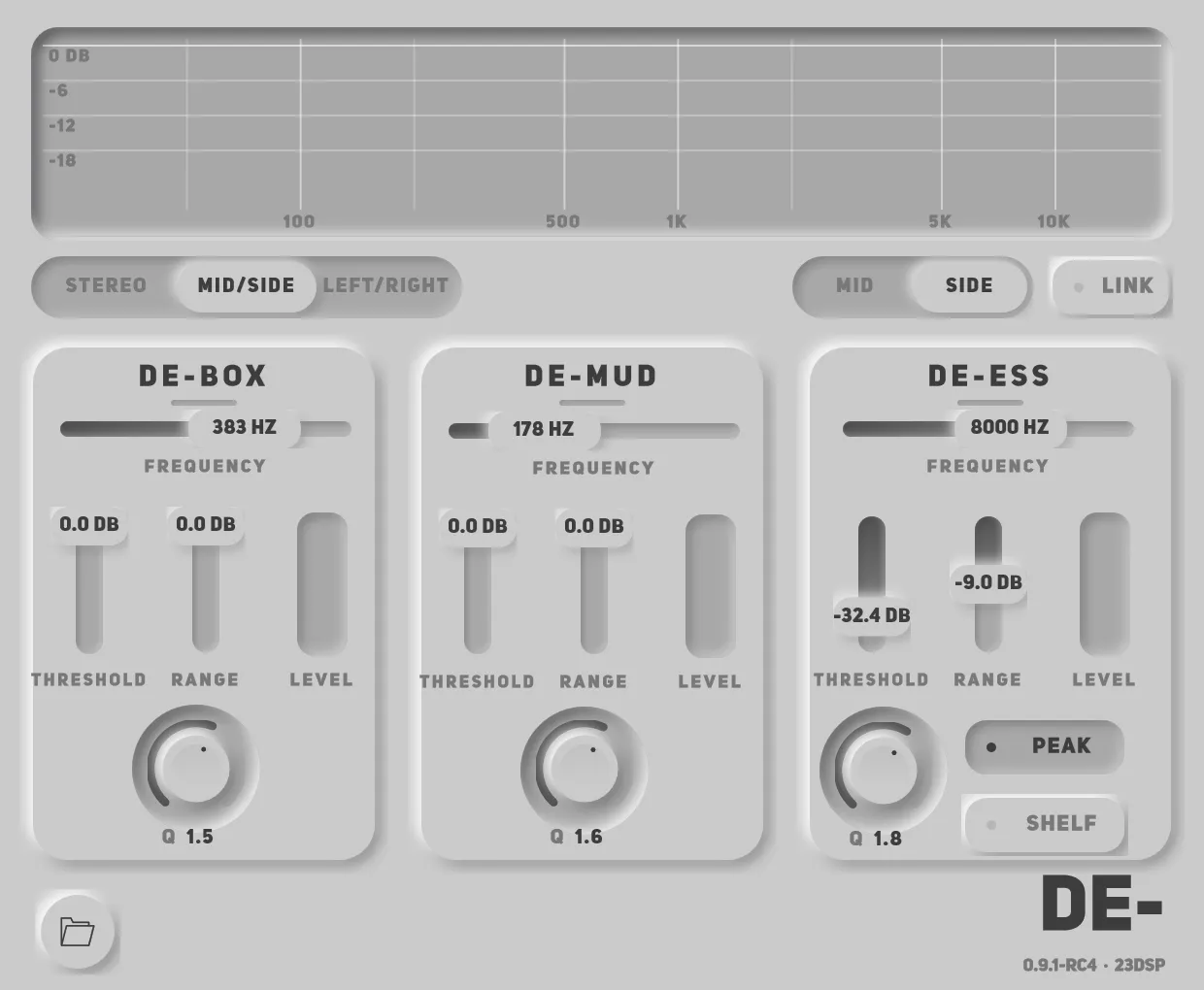
De- has been one of the free plugins people download most: three dynamic filters for the three things that make a mix harsh, muddy or boxy. It was also built on tooling I had outgrown, and on a Mac it only opened after a Terminal command. DE-_1 is the rebuild, on the same framework as 23Tape_1. This post covers what changed, what did not, and how to move a session across.
Key takeaways
- The processing is carried over section for section. In Stereo mode, DE-_1 sounds like De-, apart from one thing 0.9.1-rc5 fixed: see the update at the end.
- New: Stereo, Mid/Side and Left/Right modes, so the centre and the sides — or left and right — can take different settings.
- 68 presets filed by source, including the six De- shipped with, unchanged.
- A signed, notarised macOS installer with AU and VST3, and a Linux build.
- A separate plug-in: it installs alongside De-. Old sessions keep loading De-; saved presets can be imported.
What is the same
The part that does the work. Each section of De- is a filter whose cut is driven by a compressor, so it only cuts while there is something to cut, and by no more than its Range allows. DE-_1 carries that across from the original: the same crossover points, the same dynamic filters, the same way the Q behaves when you switch the de-esser between Peak and Shelf.
The controls are the same too. De-Box, De-Mud and De-Ess each have Frequency, Threshold, Range and Q, and De-Ess keeps its Peak and Shelf switch. If you know De-, you know the front panel of DE-_1.
What is new
Two halves, two settings. De- processed a stereo track as one thing. DE-_1 adds a mode switch:
- Stereo — the classic behaviour, and the default.
- Mid/Side — separate settings for what is in the centre and what is at the edges.
- Left/Right — separate settings for each channel of a pair.
With Link on, both halves follow the same settings. Switch it off and you can, for example, de-ess only the sides of a doubled vocal, or take mud out of the centre of a mix without touching its width. The wide vocal demo shows the first of those: Side Sibilance removes the S from the sides and leaves the centre exactly as it was.
A preset library. 68 presets, filed by what you are working on — female, male and rap vocals, hats, snares and drum loops, bass, guitars, keys, brass and winds, the mix bus — plus a set built for the split modes and four plain starting points. Each preset says what it is for.
A display you can read. The old analyser and filter curves were drawn straight onto a light panel and were hard to see. The new screen is dark, labelled, and shows how much each section is taking out as it happens.
Installs everywhere.
| De- | DE-_1 | |
|---|---|---|
| Windows | VST3 | VST3 |
| macOS | AU, unsigned — Terminal step to open | AU and VST3, signed and notarised installer |
| Linux | — | VST3 |
| Stereo handling | Stereo | Stereo, Mid/Side, Left/Right |
| Presets | 6 | 68, including the original 6 |
Moving from De-
DE-_1 is a separate plug-in, not an update. It has its own identity, so both can stay installed and nothing you have already mixed changes under you: a session that used De- goes on loading De-.
- Sessions — settings stored inside an old session do not transfer. To move a track, insert DE-_1 beside De-, match it by ear, then remove De-.
- Presets — these do transfer. Open DE-_1’s preset browser, import the
.presetfile you saved in De-, and it loads as it was.
The De- downloads stay on the Gumroad page for a while, marked as outdated.
What it costs
Nothing, as before. If it earns a place in your sessions, the About page says how to support the work.
This is 0.9.1-rc4 — a release candidate, wearing its version while the last reports come in. The guide to every control covers the sections and the stereo modes in detail. If something misbehaves, write to hi.23dsp@gmail.com with your OS and your DAW.
Update, 24 September 2026
0.9.1-rc5 changes one thing about the sound, on purpose. De- splits the signal into bands, works on them and adds them back. In the original, and in DE-_1 up to 0.9.1-rc4, the two upper bands took an all-pass at the lowest crossover where a Linkwitz-Riley tree takes a high-pass. The bands did not sum back flat: the region between the De-Mud and De-Box corners came out about half a decibel loud, whether or not anything was cutting.
rc5 gives those bands their high-pass. The split sums flat, so with the sections idle the plug-in passes the signal through unchanged. Everything the three sections do is as it was. If you have a mix that was balanced against that half decibel, it will sit a touch differently.
rc5 also lowers the macOS minimum to 10.13 on Intel machines. Apple Silicon starts at macOS 11 either way.